Kubernetes Cheatsheet
Kubernetes Basics
Here you can find basic k8 commands I gathered while following K8s Tutorials that are available in the kubernetes site. The tutorials are free, interactive and can be done from your browser without installing any SW.
As I progress in my studies I will be updating the cheatsheet, so you can expect more changes in the future.
Install kubectl and minikube
1brew install kubectl2brew install minikubeminikube
Start, stop, pause, unpause, delete all minkiube
1minikube start2minikube stop3minikube status4minikube pause5minikube unpause6minikube delete --allSsh into minkube
1minikube ssh [flags]On minikube open your ports for your app
1minikube service list2minikube service my-serviceSource minikube get started
K8s Cluster
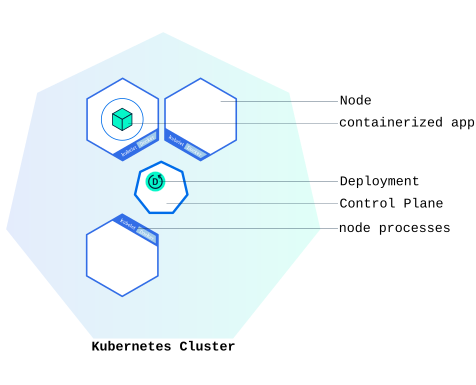
Kubernetes coordinates a highly available cluster of computers that are connected to work as a single unit. The abstractions in Kubernetes allow you to deploy containerized applications to a cluster without tying them specifically to individual machines.
Kubernetes automates the distribution and scheduling of application containers across a cluster in a more efficient way.
A Kubernetes cluster consists of two types of resources:
- The Control Plane
coordinatesall activities in your cluster, such as scheduling applications, maintaining applications’ desired state, scaling applications, and rolling out new updates. - Nodes are the workers that run applications
See k8 version
1kubectl versionSee nodes in k8
1kubectl get nodesPods
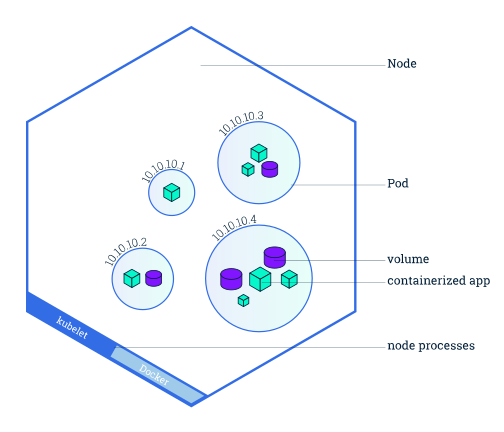
A Pod (as in a pod of whales or pea pod) is a group of one or more containers, with shared storage and network resources, and a specification for how to run the containers.
A Pod’s contents are always co-located and co-scheduled, and run in a shared context. A Pod models an application-specific “logical host”: it contains one or more application containers which are relatively tightly coupled.
Create a deployment
1kubectl create deployment kubernetes-bootcamp --image=grc.io/google-samples/kubernetes-bootcamp:v1See deployments
1kubectl get deploymentsCreate a proxy
1kubectl proxySee PODs running in default namespace
1kubectl get podsView containers inside the POD
Describe works with most K8s primitives: node, pod, deployments.
1kubectl describe podsSee container logs
1kubectl logs <POD_NAME>Execute commands inside a container
1kubectl exec <POD_NAME> -- env2kubectl exec -ti <POD_NAME> -- bashWait for a POD to be ready by label
1kubectl wait --for=condition=ready pod -l app=inventoryOnce you see the output condition met of the above commands it means your microservice is ready to receive requests.
You can also monitor the status manually with watch however you need to exit manually with Ctrl-C
1kubectl get --watch podsServices
Services allow your applications to receive traffic. Services can be exposed in different ways by specifying a type in the ServiceSpec:
- ClusterIP (default) - Exposes the Service on an internal IP in the cluster. This type makes the Service only reachable from within the cluster.
- NodePort - Exposes the Service on the same port of each selected Node in the cluster using NAT. Makes a Service accessible from outside the cluster using
<NodeIP>:<NodePort>. Superset of ClusterIP. - LoadBalancer - Creates an external load balancer in the current cloud (if supported) and assigns a fixed, external IP to the Service. Superset of NodePort.
- ExternalName - Maps the Service to the contents of the externalName field (e.g.
foo.bar.example.com), by returning a CNAME record with its value. No proxying of any kind is set up. This type requires v1.7 or higher of kube-dns, or CoreDNS version 0.0.8 or higher.
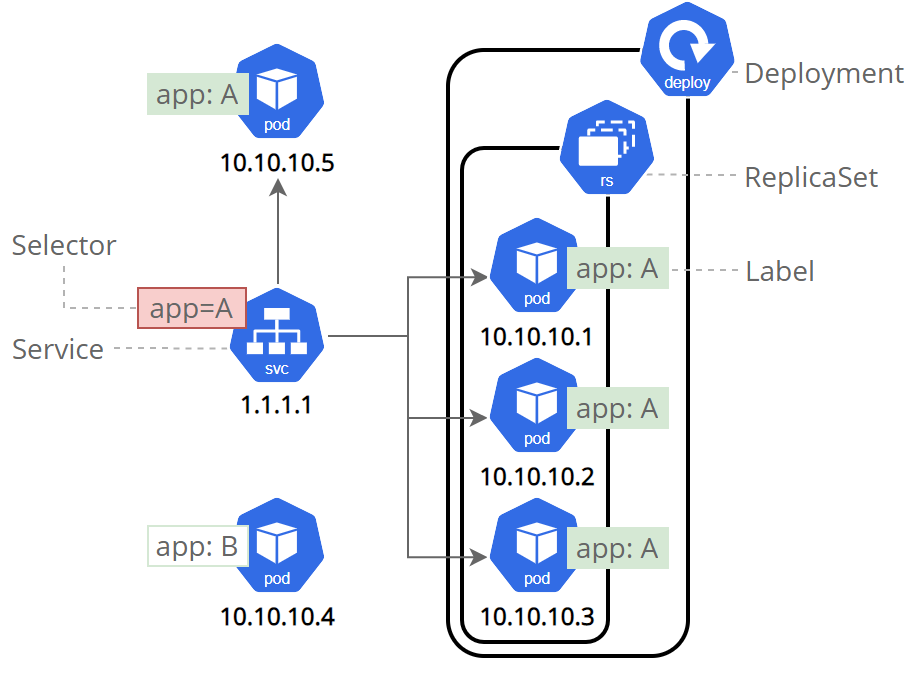
Services match a set of Pods using labels and selectors, a grouping primitive that allows logical operation on objects in Kubernetes. Labels are key/value pairs attached to objects and can be used in any number of ways:
- Designate objects for development, test, and production
- Embed version tags
- Classify an object using tags
List current services
1kubectl get servicesCreate a service & expose it
For minikube, NodePort is used.
1kubectl expose deployment/kubernetes-bootcamp --type="NodePort" --port 8080See port opened externally
1kubectl describe services/kubernetes-bootcampSee the POD label
1kubectl describe deploymentGet POD and service by label
1kubectl get pods -l app=kubernetes-bootcamp2kubectl get services -l app=kubernetes-bootcampGet POD port and set it as env var
1export NODE_PORT=$(kubectl get services/kubernetes-bootcamp -o go-template='{{(index .spec.ports 0).nodePort}}')2echo NODE_PORT=$NODE_PORTGet POD name and set it as env var
1export POD_NAME=$(kubectl get pods -o go-template --template '{{range .items}}{{.metadata.name}}{{"\n"}}{{end}}')2echo Name of the Pod: $POD_NAMEAdd a new label to the POD
This action will append only and will not remove any existing labels
1kubectl label pods $POD_NAME version=v1delete a service by label
1kubectl delete service -l app=kubernetes-bootcampScaling
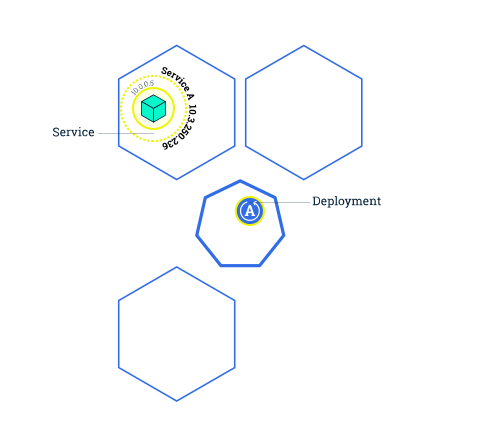
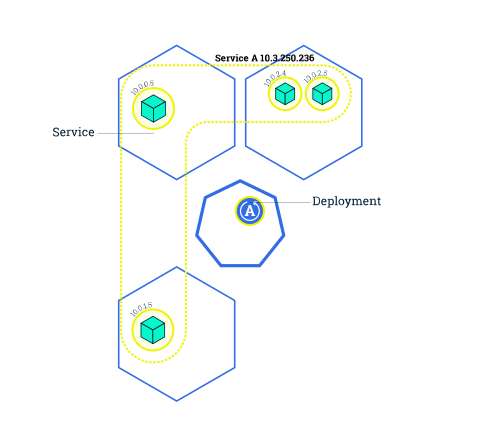
Scaling is accomplished by changing the number of replicas in a Deployment.
Scaling will increase the number of Pods to the new desired state. Kubernetes also supports autoscaling of Pods
Services have an integrated load-balancer that will distribute network traffic to all Pods of an exposed Deployment.
See ReplicaSet created by the deployment
1kubectl get rsScale the deployment
In this case is scale to 4 replicas
1kubectl scale deployments/kubernetes-bootcamp --replicas=42
3# verify by4kubectl get deployments5kubectl get pods -o wide6kubectl describe deployments/kubernetes-bootcamp
Find the expose IP that is load balancing
1kubectl describe services/kubernetes-bootcampRolling Updates
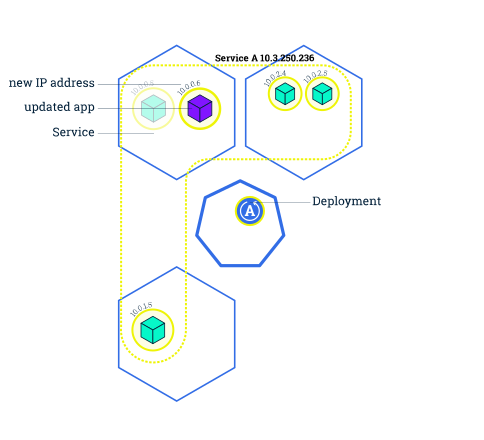
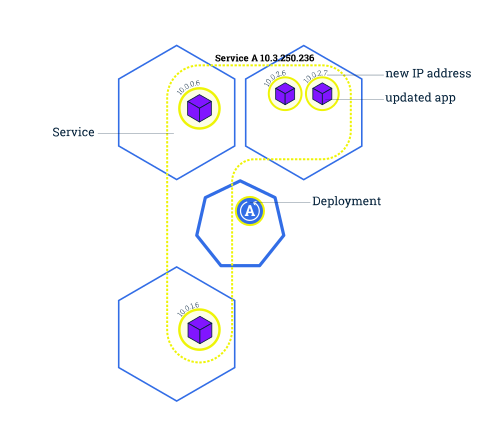
Rolling updates allow Deployments’ update to take place with zero downtime by incrementally updating Pods instances with new ones.
if a Deployment is exposed publicly, the Service will load-balance the traffic only to available Pods during the update. An available Pod is an instance that is available to the users of the application.

Update image
Update the image of the application to version 2
1kubectl set image deployments/kubernetes-bootcamp kubernetes-bootcamp=jocatalin/kubernetes-bootcamp:v22
3# You can review by checking the POD status4kubectl get pods5
6kubectl rollout status deployments/kubernetes-bootcamp
Rollback
Rollback the deployment to the last working version
1kubectl rollout undo deployments/kubernetes-bootcampConfigMaps & Secrets
There are several ways to set environment variables for a Docker container in Kubernetes, including:
- Dockerfile
- kubernetes.yml
- Kubernetes ConfigMaps - Link to its Documentation
- Kubernetes Secrets - Link to its Documentation
- secrets are only store as base64 encoding
ConfigMaps and Secrets are stored as key-value pairs.
Create a ConfigMap
1kubectl create configmap sys-app-name --from-literal name=my-system2configmap/sys-app-name createdCreate a Secret
1kubectl create secret generic sys-app-credentials --from-literal username=bob --from-literal password=bobpwdBonus Materials
These are some materials I find very useful to learn K8s.
- Kubernetes Tutorial for Beginners from TechWorld with Nana. Check the timestamps in the description.
- Kubernetes Course - Full Beginners Tutorial from freeCodeCamp.org
- vscode-kubernetes-tools. So you don’t write manifest from scratch.
- Check the rest of the tutorials on the k8s page